OPut AI to Work
October 29th
Build Your Personal AI Operating System
A hands-on workshop by AI Growth Plan
Hands-On Guidance · Your Business, Your Voice · A Practical AI Starting Point
Stop starting over with AI.
Join for a practical, hands-on workshop where you'll begin building an AI assistant around your business, priorities and the way you like to work.
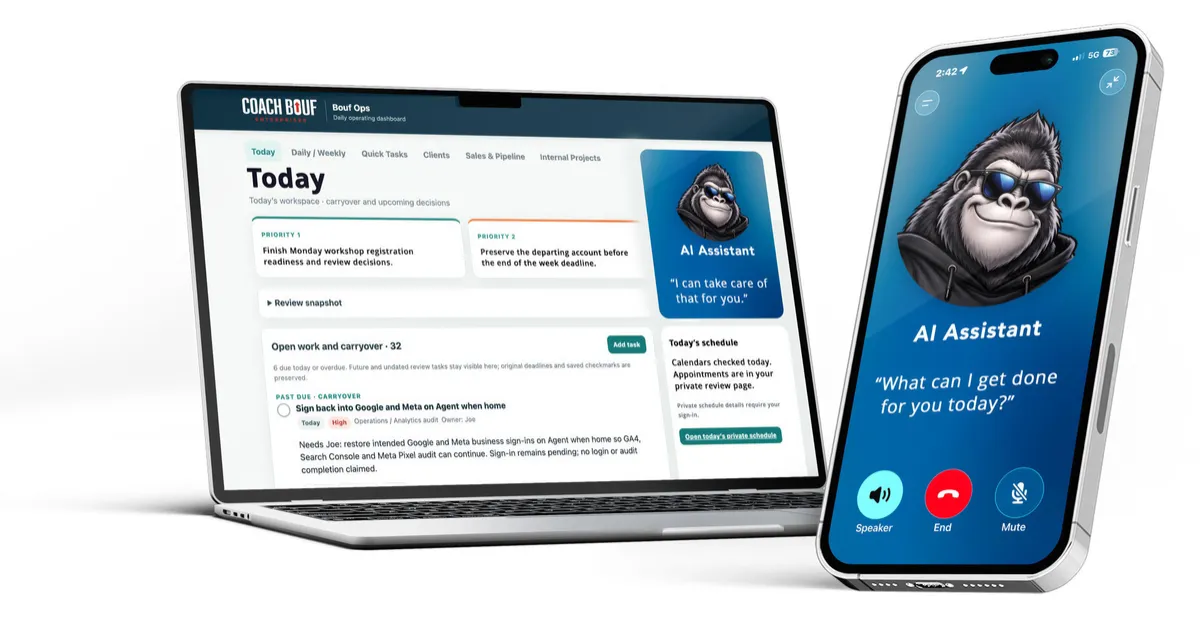
THE MORNING RHYTHM
Coffee. A conversation.
A clearer day.
Each morning, Jarvis and I review what matters, what's ready and what needs my decision. The dashboard gives that conversation a place to land - and a next step.
- What Matters: Priority items ranked before email or messaging apps open
- What's Ready: Briefs, drafted replies, and background memos pre-staged
- What Needs Decision: High-leverage execution forks with zero cognitive friction
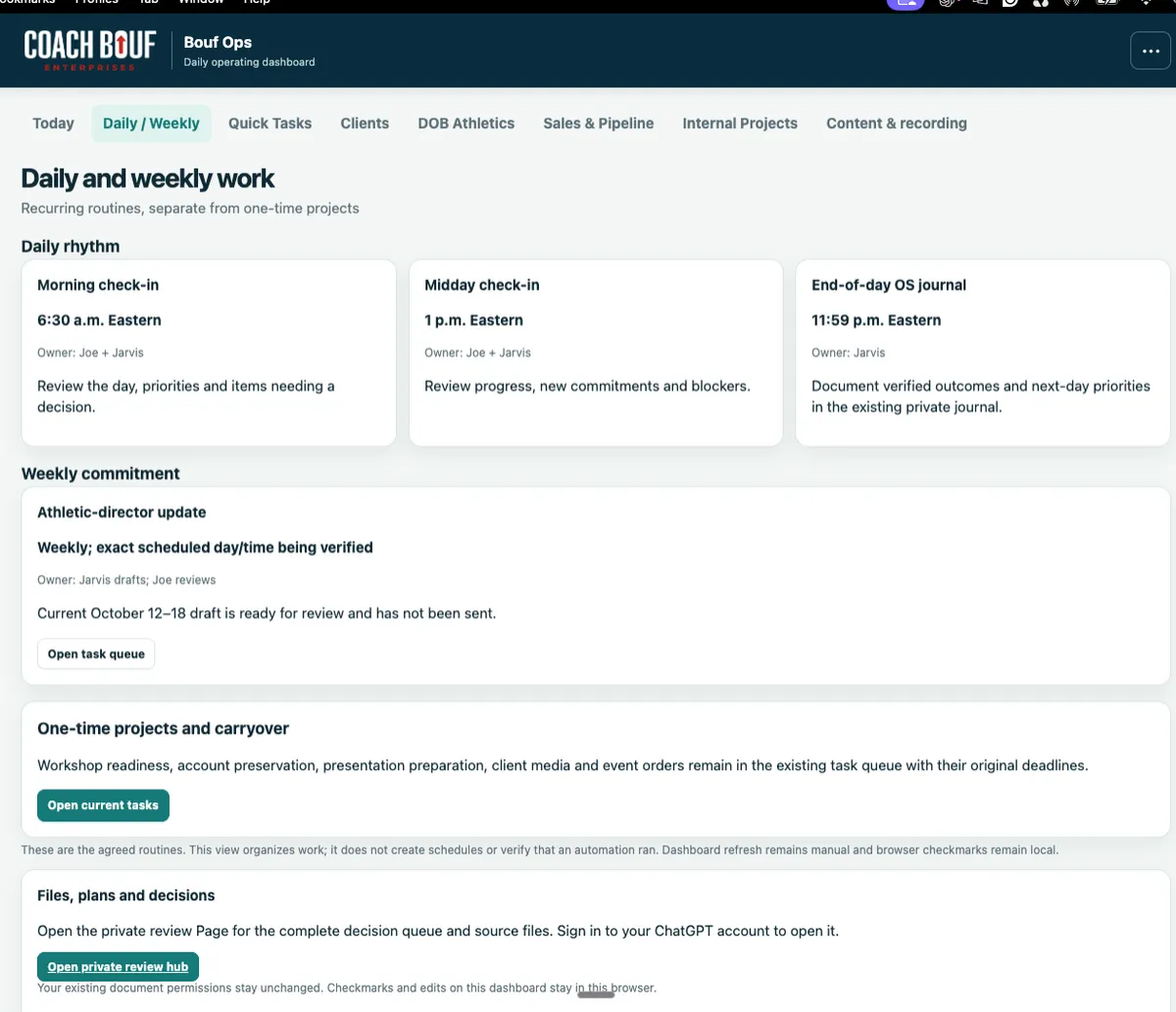
Watch samples of real daily task discussions
HANDS-ON IMPLEMENTATION
What You'll Do
Bring your laptop. Mike and I will help you get set up and create seven social posts tailored to your business. We'll review them together, and you decide when to publish.
Personal 1-on-1 Support • Zero Tech Overwhelm • Leave With Finished Work
REAL WORK EXAMPLES
Six ways an AI OS
can help with real work.
Real examples of completed preparation, checked changes and honest testing—with human judgment kept in the loop.
Prepared a speaking presentation together
Joe shared the audience, topic and source material. Jarvis helped research and organize it, then created the slides, speaker notes and handout. Joe reviewed the material and chose the speaking route. A 20-slide deck, PDF, two-page kit and shorter speaking route were delivered; the event outcome and video opener were not established.
Revised a video from specific feedback
Joe brought the approved script, original clips and specific feedback. Jarvis revised the selected introduction, preserved the body scenes, repaired caption timing and checked the landscape and vertical exports. Joe approved the creative changes and any paid generation. Revised files were delivered for review; final client acceptance and publication remained separate.
Built a daily view of Joe’s work
Joe shared his commitments, task status and decisions. Jarvis organized a daily and weekly dashboard view that separated completed work from decisions and blockers. Joe reviewed the priorities and approved the snapshot. The snapshot was published and checked; live calendar sync and durable cross-device checkmarks were not established.
Saved an agreed schedule change
Joe and Jarvis checked an email discussion against the scheduled event. Joe confirmed the agreed postponement, and Jarvis saved the change and read the event back. Proposed replacement dates that had not been agreed, and separately blocked updates, stayed open.
Resent the right proposal
Joe asked Jarvis to resend a proposal that had already been sent. Jarvis recovered the authoritative PDF and matched the intended recipient. Joe authorized the resend and its destination; Jarvis sent the file and verified it in Sent. Acceptance, payment and agreement were not implied.
Tested a workflow before calling it ready
Joe and Jarvis tested a workflow using a step-by-step checklist, deployed source and recipient-side findings. Jarvis checked permissions, connections and approval behavior, uncovering disconnected queue settings and an approval defect involving unsaved edits. The diagnosis was completed, but repair remained open and the live workflow was not end-to-end operational. Joe still needed to settle business rules and authorize configuration or code changes.
OPERATIONAL BRIEFING
Workshop Logistics
Critical attendance coordinates and schedules. Preliminary specifications are outlined below to support attendee travel planning and calendar locks.
Date
Thursday, October 29, 2026
Time
8:00 am- 11 am
Venue
35 Nutmeg Drive
Trumbull, Connecticut
Multipurpose room next to the Taste of Garden Café
WHAT COULD YOUR TIME
BACK BE WORTH?
A clear way to evaluate it.
$75 Your hourly consulting rate 47 HOURS Additional paid work to generate $3,525 LESS THAN 1 HOUR A WEEK Across a 52-week year
We build your AI operating system around recurring tasks in your business, with a clear plan to measure time saved.
Start with the work slowing you down.
See what getting that time back could mean.
[Let’s Find Your Biggest Time Savings] Illustrative revenue comparison, not a guaranteed return.
Assumes additional work is booked and paid. Figures exclude expenses, software subscriptions, and ongoing support.
INVESTMENT OPTIONS
Choose Your Plan
Reserve your seat for the live implementation workshop. Select the payment pathway that fits your financial preferences.
LOWEST TOTAL WORKSHOP PRICE
Full Upfront Payment
$5,000 $3,500
One workshop payment.
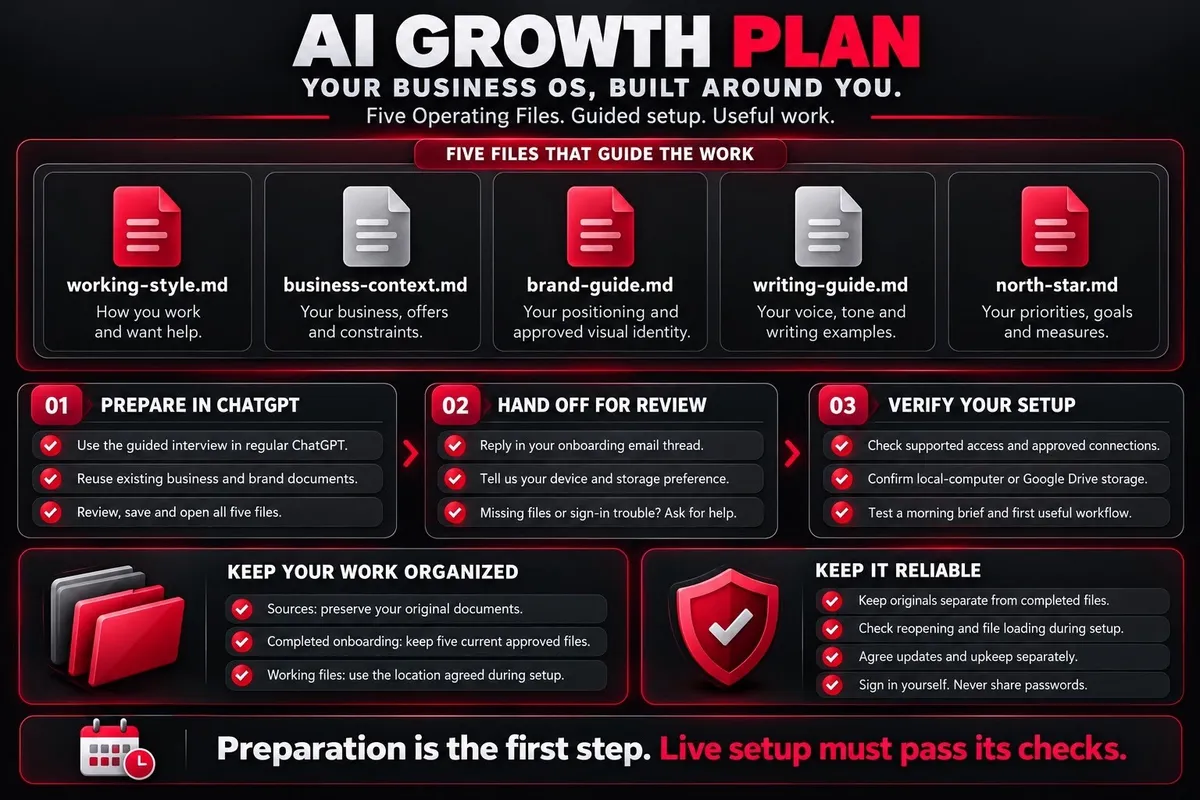
- Five Operating Files foundation
- Guided personal AI setup
- Seven-post hands-on business exercise
- Review of the exercise content with Joe and Mike
FLEXIBLE FINANCING
Monthly Installment Plan
$5,000 4 × $1,000
Four monthly payments of $1,000 (totaling $4,000). Protect operating cash flow with predictable monthly billing.
- Five Operating Files foundation
- Guided personal AI setup
- Seven-post hands-on business exercise
- Review of the exercise content with Joe and Mike
Installment Terms: Installment plan totals $500 more than the upfront price ($4,000 vs. $3,500).
ChatGPT Software Is Separate: The planned participant setup uses ChatGPT Pro 100 (US$100/month), paid directly to OpenAI. This is not included in your workshop fee. You do not need to upgrade before registering.
FAQ
Questions About
Your AI OS
Practical answers about putting AI to work, one checked workflow at a time.
What is an AI OS?
An AI OS helps organize the email, calendars, schedules, tasks and priorities you choose to connect or share. It makes deadlines and expectations clearer and separates work that needs your judgment from work AI can help prepare or carry out with permission. You remain responsible for the decisions.
What can it do?
It can act as a thought partner and executive assistant across connected work, personal and family accounts and calendars. Depending on the tools, access and permissions available, it can help with research, supported tasks, reports, assignments and emails. Account owners decide what is shared, and consequential actions follow the review and approval points you set.
Where do I start?
Choose one recurring job you understand. Supply the right sources, define a useful output and review the result before expanding the workflow.
Do I need technical skills?
No technical background is needed to begin. We start with an interview about the areas you choose to share, then build a structure around your needs. You can use voice conversations to explain your work and review results. Connecting accounts and completing setup still require your participation and permissions as needed.
Do I stay in control?
Yes. You set the review and approval points for messages, publication, spending and other consequential actions. AI can prepare work and help with approved steps; a draft does not authorize sending, publishing or spending.
What about private information?
Use only suitable source material, check access and sharing settings, and remove identifying details from public examples. Privacy depends on the actual platforms and configuration.
How do we know it works?
Check the saved result: open the file, read the event, verify the message or test the workflow. Keep completed work separate from drafts and blockers.
What should I expect?
Start with one useful process and improve it through real use. Savings need measurement. Software subscriptions are separate customer costs; requirements depend on the setup. Review the workshop price and the refund/support policy shown on this page before buying.
TRANSPARENCY & POLICIES
Refund & Terms
We are committed to total clarity regarding workshop enrollment, schedule commitments, and participant support. Please review the refund timelines and operational provisions detailed below.
- Refund window: Full refunds are available from purchase through November 5, 2026 at 11:59 p.m. Eastern for both the $3,500 upfront option and the four monthly payments of $1,000 option. An approved full refund also cancels any remaining installments.
- After the window: No change-of-mind refunds after November 5, 2026 at 11:59 p.m. Eastern. This does not remove our delivery obligations or applicable customer rights.
- Included setup support: Email support and scheduled Zoom or Google Meet sessions are included until the agreed setup checklist is complete: organized operating files, a private Today dashboard, and a reusable Seven Social Posts skill. The customer supplies the needed account access and participates in setup; work pauses while we wait for those inputs. Extra features and ongoing coaching are separately priced. A monthly group check-in is planned, with no promised dates or scope.
For enrollment or setup-support questions, contact AI Growth Plan.

Empowering modern business operators with high-leverage AI architectures, repeatable growth systems, and production-grade execution frameworks.
© 2026 AI Growth Plan. All rights reserved. Designed for elite enterprise operators.